
By Sam Barkley, Ads Guyana
Ads Guyana (Ads GY) offers two ways to begin preparing an advertisement on its posting page: the ordinary listing form and Easy Chat Listing. The useful choice depends on what you are advertising and how you prefer to provide information. Neither option removes your responsibility to describe the item accurately, select the right category or check the details before submission.
Start with the type of advertisement
Easy Chat Listing currently supports physical-item sales. A used phone, a table or another supported item can be described in conversation and organised into listing fields. Property, rentals, jobs and services should go through the regular form, which remains visible on Post Free Ad.
This distinction matters because different listings need different information. A rental needs a rent period and property details; a job needs employment information. Do not force one of those advertisements into a product category simply to use chat. Choose the ordinary form and complete the fields appropriate to the listing.
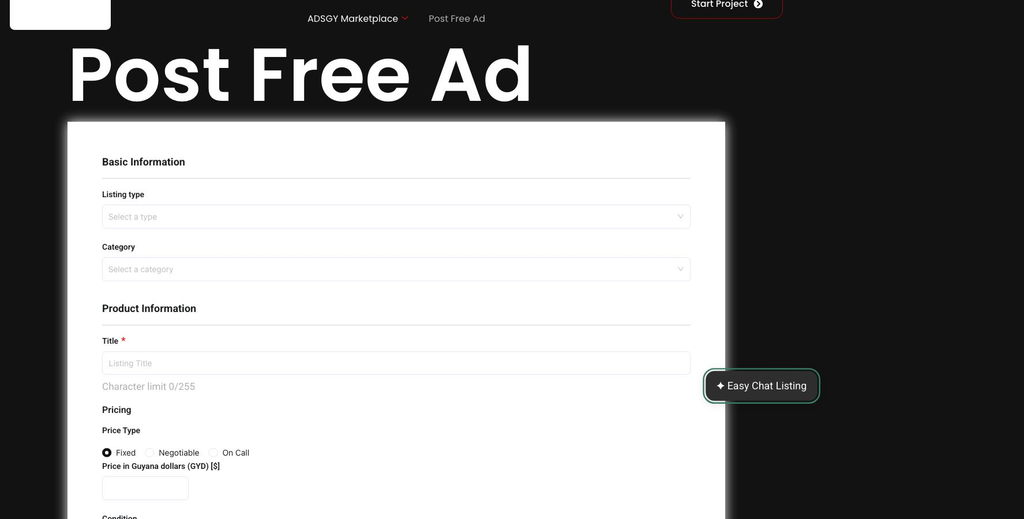
Choose chat when you prefer explaining
Chat can help when you know the facts but do not want to decide where each one belongs. You might say: “Used wooden dining table with four chairs, scratches on the tabletop, collection in Georgetown, GYD 35,000 negotiable.” That illustrative message gives the assistant several details to organise at once.
Read its response and check the review fields. Conversational input is still input: an unclear phrase can produce an unsuitable title or description. You can clarify what you meant, ask a relevant website question, or edit the review directly. The assistant should work from your facts rather than invent the table’s dimensions, wood type or condition.
Choose the form when you prefer direct control
The regular form is useful if you already have a finished title, description, photographs and asking price. You can enter them into the available fields without waiting for an AI response. It is also the suitable route for listing types outside the assistant’s physical-item scope.
Someone advertising several similar items may prefer a prepared checklist beside the form. Someone advertising one unfamiliar item may prefer explaining it conversationally. These are different working preferences, not evidence that one route guarantees better sales or reaches a different audience.
Compare how the details are entered
In chat, sent messages help build a structured review containing the title, description, condition, category, location and pricing information. You must inspect that review. In the ordinary form, you enter the fields yourself and follow its required-field instructions. Both routes need factual descriptions and appropriate contact information.
Keep prices clear in Guyana dollars. State whether the amount is fixed or negotiable, and explain collection or delivery arrangements when you know them. Avoid wording such as “everything included” if an accessory shown in a photograph is not part of the sale. Buyers should not need to guess what the price covers.
Understand photos and privacy
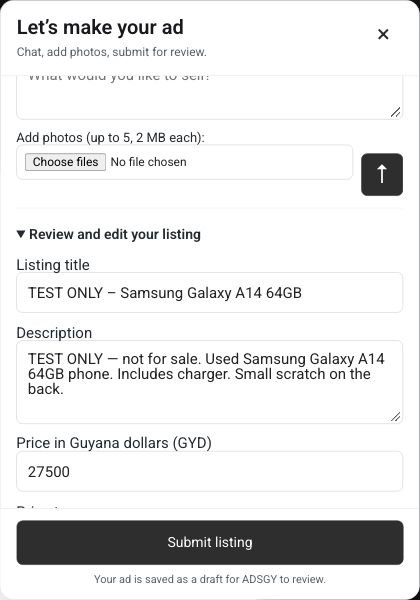
Chat includes photo attachment controls. Its current limit is five accepted images, no larger than 2 MB each; check the panel for the current limits. Both current posting routes allow five images of up to 2 MB each. Follow the limits shown in the route you use if the website configuration changes.
The chat does not inspect photos or identify faults from them. Describe important defects yourself. Keep contact details in the separate contact fields. Read the AI notice: conversation text is processed by Google’s service, whose free tier may use content for product improvement. Chat is currently for adults using it from Guyana.
Understand the final action
In Easy Chat Listing, the send arrow sends a conversational message; Submit listing is the final draft action. Send unfinished text before submitting, review the terms and complete required details. A successful chat submission creates an Ads Guyana draft for owner review rather than publishing automatically.
The regular form has its own submission instructions. Follow its displayed confirmation and review process. Do not assume opening chat, selecting photos or receiving an AI reply has submitted either version of your advertisement.
Frequently asked questions
Can I close chat and use the ordinary form?
Yes. The original form remains available. Closing the popup preserves chat entries during the current page session, but do not assume the two routes automatically share every field or photo.
What should I do if chat is unavailable?
Use the regular form or return later. Check the review before resending details, and do not treat a provider error as a saved draft.
Choose your route on Post Free Ad. For direct field-by-field instructions, read how to post a free ad on Ads Guyana.
More Easy Chat Listing guides: How to Correct Your Ad in Easy Chat Listing · Set clear GYD prices and Guyana locations with Easy Chat Listing · What happens after Submit listing? Draft review and published ads