
By Sam Barkley, Ads Guyana
A useful advertisement tells buyers what an item costs and where they can collect it. Those two details can prevent several rounds of messages before anyone discusses the item itself. Ads Guyana (Ads GY)’s Easy Chat Listing helps you put your own price and location into a physical-item listing, then check the result before submitting it for owner review.
You do not need to write a polished advertisement first. Explain what you are selling in ordinary language. The assistant can organise the facts you supply, but it does not value your item, decide what buyers will pay or promise a sale.
Start with the item and your asking price
Sign in on Post a free ad and open Easy Chat Listing. Read the conversation notice before agreeing to use the chat. Tell the assistant the item, its actual condition and the price you want in Guyana dollars. Type GYD alongside the amount if you want the currency to be especially clear.
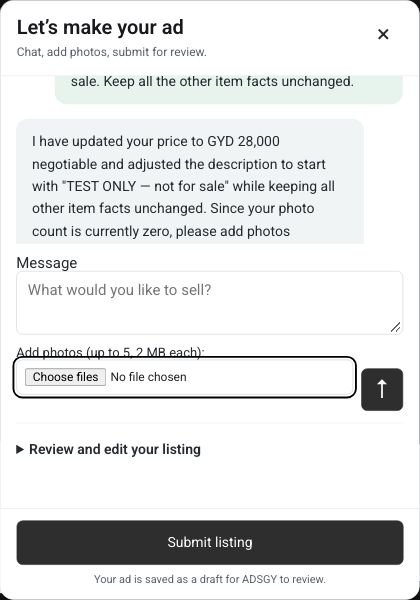
Use the arrow Send button to send your message. The assistant needs a factual description, condition, physical-item category, location and a price or On call option. Give several details together if that feels more natural; you can correct a price later without starting the listing again.
Choose the pricing option that matches your offer
Fixed means you are stating a set asking price. Make clear what that amount includes: the item alone, or specific accessories you have agreed to sell with it. Do not imply that delivery is included unless you actually offer it at that price.
Negotiable lets you state an asking amount while indicating that you will consider offers. It does not mean every offer will be accepted. You still choose the amount and decide which enquiries to discuss.
On call is available when you want a buyer to contact you about the price instead of publishing a numeric amount. It can lead to more price questions, so consider whether a visible asking price would make your ad more useful. This option is not an automatic valuation request to the assistant.
Give a useful location without publishing private details
State the town or area where the item is available. If the assistant cannot match your wording to an available location, answer its clarification or choose the correct option in review. Do not select a nearby place merely because it sounds familiar.
Your public listing does not need your home address, workplace schedule or private directions. Discuss precise collection arrangements separately with the person you choose to meet. If delivery is possible, state the area and who pays for it using facts you can honour; Ads Guyana does not arrange that service for you.
Check the price and location before submitting
Open Review and edit your listing. Check the GYD amount, pricing option, category and town/location together with the title and description. A price mentioned in chat should also appear correctly in the review fields. Correct any mismatch before proceeding.
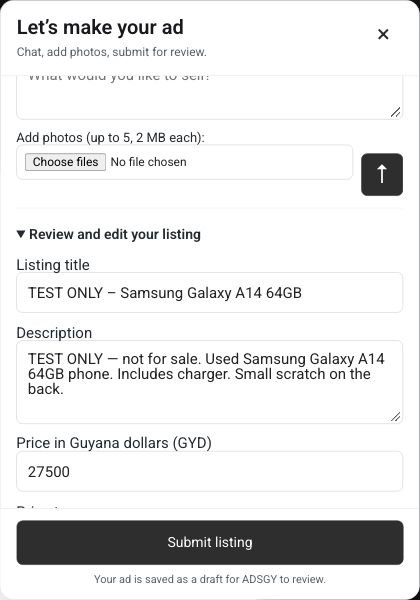
Add your actual item photos through the composer: up to five JPG, PNG or WebP images, 2 MB each. The assistant does not inspect pictures or use them to calculate a price. Keep contact phone and optional WhatsApp in their separate review fields, and fill contact email if the form requests it.
An illustrative message
“I’m selling my used wooden desk in Georgetown. The asking price is GYD 18,000, negotiable. There are scratches on the top. Collection only.” This is an example of wording, not a real offer or a recommended desk price. Replace every fact with your own. Add measured dimensions and any other facts a buyer needs rather than asking the assistant to guess them.
Frequently asked questions
Can I change my price after chatting?
Yes, correct the amount in chat and send that correction, or edit the price in review before submission. Recheck the pricing option too. If text remains unsent in the composer, send it first so its facts are included.
Does the assistant publish the advertisement immediately?
No. Confirm your authority to sell, accuracy and acceptance of the terms, then use Submit listing. That saves a draft for Ads Guyana owner review. It does not guarantee publication or a review deadline.
Prepare your free ad
Ready with your item facts, asking price and location? Post your ad free on Ads Guyana. Easy Chat Listing supports signed-in physical-item sellers; use the regular form on that page for jobs, services, property or rentals.
More Easy Chat Listing guides: Post a Free Ad in Guyana with Easy Chat Listing · Easy Chat Listing or the Regular Ads Guyana Form? · How to Add Photos in Ads Guyana Easy Chat Listing