By Sam Barkley, Ads Guyana
Pressing Submit listing in Easy Chat Listing is the step that sends your prepared advertisement to Ads Guyana (Ads GY) as a draft. It is different from sending a chat message and different from publishing an ad that buyers can browse. Knowing those differences helps you check the result without assuming that an assistant reply means your item is already on the marketplace.
A chat reply is preparation, not publication
You can describe your item, answer questions and correct details in the conversation. The assistant uses what you provide to organise a title, description and other listing fields. Those replies help prepare an advertisement; they do not independently create a public offer.
The message arrow sends the conversation message. Submit listing is the final draft action. If you have written a correction but have not sent it, send it first so the prepared details can reflect your change. Read the review fields rather than relying only on the last chat response.
What the final review checks
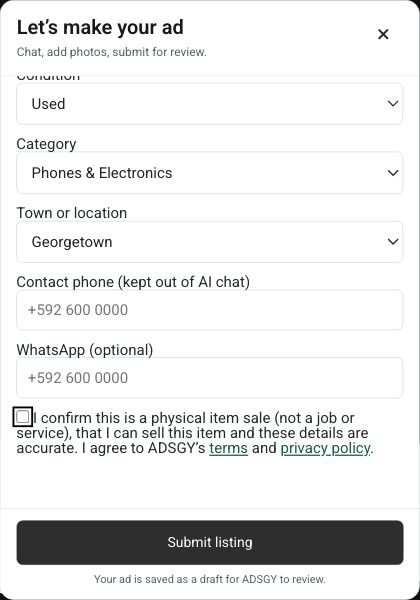
Before submission, check the title, factual description, condition, category, location and GYD price or On call choice. Complete any required native fields shown for your category. Enter phone, WhatsApp and any available contact email in their separate fields. Your account email is not automatically copied into the contact email field.
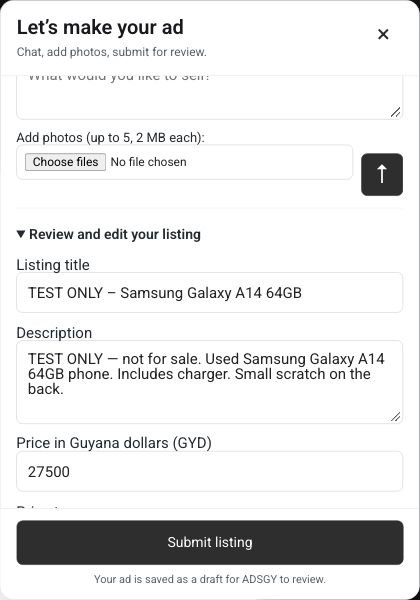
Check your selected photos, too. The current limit is five supported images, up to 2 MB each. Uploading a photograph does not mean the AI has examined it. The photo control and the written description serve different purposes, so make sure they describe the same item.
The final seller confirmation covers the physical-item sale, your ability to sell it, accuracy and agreement to the marketplace terms and privacy policy. Read that confirmation before accepting it. Do not treat it as a way to bypass missing or inaccurate details.
What happens when something is missing
If required information or the confirmation is missing, the assistant shows the review and asks you to complete it. Correct the indicated field and read the remaining details before trying submission again. A validation message is not a public listing and does not mean the missing information was accepted.
For example, a seller might prepare a used desk advertisement with a title and description but leave the location blank. The next useful step is to choose the actual location, not to assume the assistant can infer it from a photograph. Required information still matters even when the advertisement was prepared conversationally.
What a successful submission means
On a successful Easy Chat Listing submission, Ads Guyana saves a native classified-listing draft associated with the signed-in seller for administrator review. The AI cannot publish it automatically. A saved draft is therefore a submitted advertisement awaiting Ads Guyana's review, not confirmation that buyers can already find it in search or browse it publicly.
There is no promised review time in this guide. Submission also does not guarantee acceptance, enquiries, a sale or appearance on Google. Check the actual response shown after submission. If the result is unclear or you need a correction after sending it, use Contact and explain which ad you submitted without sending passwords or private documents.
How a published ad differs
A published advertisement has a public listing page that buyers can visit. You can browse the marketplace to understand that public format. Do not use a draft confirmation as the buyer-facing link for your item.
The ordinary posting form remains a separate route. It has its own submission process and is the appropriate option for jobs, rentals, property and services outside the chat's physical-item scope. Do not assume every status label or step is identical between the regular form and Easy Chat Listing. The posting guide explains the regular form.
Frequently asked questions
Does Submit listing publish my item immediately?
No. Easy Chat Listing saves a draft for administrator review. Read the confirmation and wait for an actual public listing before describing the ad as published.
Should I start a second ad if I am unsure whether it saved?
First read the submission result and contact Ads Guyana if you cannot establish what happened. Creating another advertisement immediately can cause confusion; uncertainty is not proof that the first attempt failed.
Can closing the chat replace final submission?
No. Closing and reopening the panel during the current page session can preserve entered details, but that is not the same as saving a submitted draft. Do not assume a refresh or a later visit will preserve unfinished work.
Prepare a free physical-item ad at Post Free Ad. Send your corrections, check the review and use Submit listing when the details are ready.
More Easy Chat Listing guides: Post a Free Ad in Guyana with Easy Chat Listing · Easy Chat Listing or the Regular Ads Guyana Form? · How to Add Photos in Ads Guyana Easy Chat Listing