By Sam Barkley, Ads Guyana
A useful classified advertisement gives buyers enough information about an item without exposing everything about the seller. Easy Chat Listing helps organise an ad through conversation, but you choose what to share and remain responsible for checking the result. Use this checklist before chatting, selecting photos and submitting a draft on Ads Guyana (Ads GY).
Read the consent before starting
Open Post Free Ad, sign in and read the assistant's consent notice. The current chat is for users aged 18 or over using it from Guyana. It supports physical-item sales; jobs, rentals, property and services should use the regular form.
The conversation uses Google's Gemini service. Anything you type into the chat may be sent to Google, and the free-service notice explains processing and possible use to improve Google's products. Consent is a choice to make before sending information. If you do not want to use that AI conversation, the ordinary listing form remains available.
Keep the conversation about the item
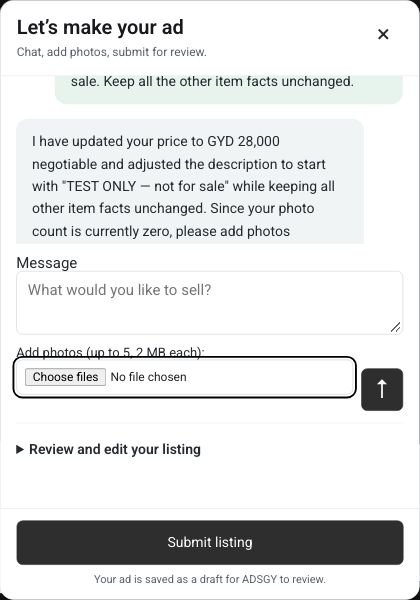
Describe the item, condition, included accessories, asking price in GYD and general location. Avoid passwords, financial account details, identity documents, private customer information or another person's contact details. You do not need to share a personal story or sensitive record to explain that a table has scratches or a phone includes a charger.
A practical starting message is: “Used wooden dining table with four chairs, Georgetown, GYD 35,000 negotiable. There are scratches on the top. Collection only.” This is an illustrative example, not a live listing or a recommended price. It gives the assistant useful item facts without a precise home address or private identification.
Use the separate contact fields
Phone, WhatsApp and the available contact email field are separate from the AI conversation and are not deliberately included in its requests. Put those details there when preparing your listing rather than typing them into chat. If you type a phone number into a message, the fact that there is also a separate phone field does not prevent that message from being sent to Google.
Check which contacts you actually want associated with your advertisement. Your account email is not automatically copied into the contact email field. Separate fields do not make a public advertisement private: assume that contact information included in a published listing can be read by visitors.
Inspect photos before selecting them
Choose pictures of the actual item and look closely at the background. Remove visible identity documents, private messages, bank information and other details unrelated to the sale. Screens on phones or laptops can reveal more than the item itself. A wider room photograph may also show information you did not intend to share.
The current photo limit is five JPEG, JPG, PNG or WebP images, up to 2 MB each. The assistant does not analyse photos; selecting an image does not verify the model, condition or ownership. Photos are not deliberately sent as part of the Gemini conversation. Uploaded WordPress image URLs can nevertheless be publicly addressable even while the listing is a draft, so a draft should not be treated as private document storage.
Check every claim in the review
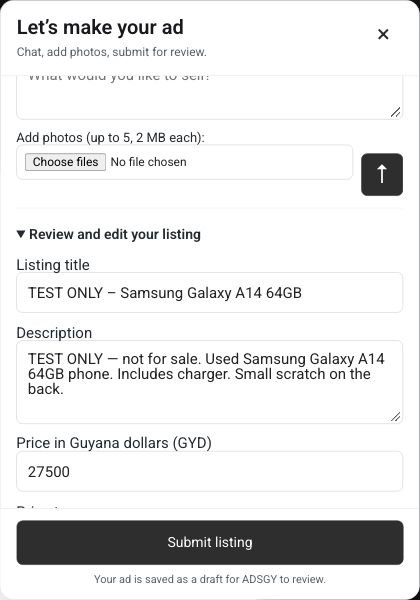
Read the title and description against the actual item. Check model numbers, quantities, included parts, faults and any measurements. Remove claims such as “perfect condition” if they are not accurate. If a detail is unknown, explain that or leave it out instead of letting polished wording hide uncertainty.
Check the price type and GYD amount, category and location separately. A good-looking description cannot correct a wrong price or the wrong area. Send corrections in the conversation, then read the updated fields again. You are approving the advertisement's information, not merely the assistant's tone.
Submit deliberately and check the result
Read the seller confirmation and the linked marketplace terms and privacy policy. Submit listing saves a draft for administrator review; it does not automatically publish the advertisement. Read the actual result rather than assuming that a successful chat reply means submission succeeded.
This checklist explains the feature's current information handling and practical review steps. It does not promise confidentiality or replace the website's policies. If you need to correct a submitted ad or ask about its information, use Contact.
Frequently asked questions
Can I paste my contact number into chat instead?
Use the separate contact field. Text typed into the conversation may be processed by Google, including contact information you put there yourself.
Does the AI verify that my photos match my description?
No. Photos are not analysed. You must check that the selected images and written facts accurately describe the same item.
Does a draft keep uploaded photos private?
Do not assume so. WordPress image URLs can be publicly addressable before an advertisement is published. Upload item photographs, not sensitive records.
Ready to prepare an accurate free ad? Visit Post Free Ad, choose the chat or regular form and review what you share before submitting.
More Easy Chat Listing guides: Post a Free Ad in Guyana with Easy Chat Listing · Easy Chat Listing or the Regular Ads Guyana Form? · How to Add Photos in Ads Guyana Easy Chat Listing