
By Sam Barkley, Ads Guyana
A used phone advertisement works better when a buyer can understand the actual device before sending a message. A brand name alone leaves questions about the model, storage, condition and what comes with it. Ads Guyana (Ads GY)’s Easy Chat Listing can help organise your answers into a draft without requiring you to write a long advertisement from scratch.
The assistant uses what you tell it. It cannot inspect your uploaded pictures, test a battery or confirm specifications. Keep the phone beside you while preparing the ad so that you can check facts instead of relying on a guess.
Gather the phone’s actual details
Write down the exact model and any storage information you can verify on the device or its packaging. State whether it is used, and describe scratches, cracks, repairs or functions that do not work. If you are uncertain about a detail, say so instead of allowing a confident but inaccurate description into the listing.
Decide which accessories are included in your asking price. A charger in the photo does not automatically mean it comes with the sale. Explain whether the charger, box, case or other items are included, and mention missing accessories when they affect a buyer’s decision.
Tell Easy Chat Listing about your phone
Sign in at Post a free ad, open Easy Chat Listing and read the consent notice. Describe the phone in normal language and use the arrow Send button. You can provide the title, condition, description, GYD asking price and town together rather than waiting for a separate question about each detail.
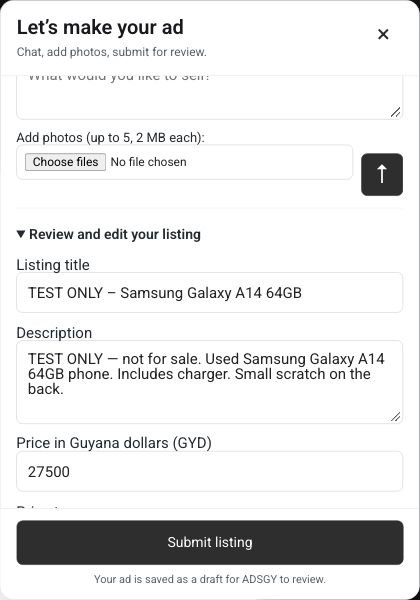
Here is an illustrative message: “The title is Used Samsung Galaxy A14. Mine has 64GB storage, a scratched back and no screen cracks. The charger is included. I want GYD 20,000, negotiable, and collection is in Georgetown.” This is not an actual offer, a market valuation or a statement about every Galaxy A14. Use only specifications and condition facts verified for your own phone.
Add photographs of the device you are selling
Use the photo control inside the chat composer. The current limit is five JPG, PNG or WebP images, 2 MB each. Show the actual front, back, sides and accessories, including visible damage. A clear first image helps a buyer recognise the item; use the selection controls to remove an unwanted image or choose your main photo before submission.
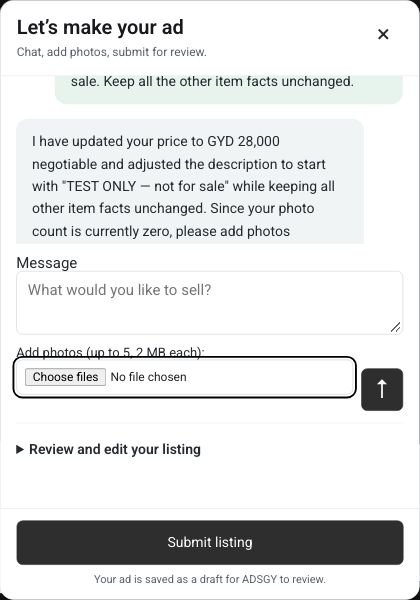
Remove private information from the screen and background. Do not include account passwords, verification codes, personal documents or sensitive identifiers. Pictures stay on your device until you submit the draft, but WordPress image URLs are publicly addressable after upload, even while a listing is a draft.
Review the advertisement and separate contact fields
Open Review and edit your listing and compare the extracted description with the phone in front of you. Check the title, New or Used condition, Phones & Electronics category, location and GYD price. Choose Fixed, Negotiable or On call according to your offer. Correct omissions or mistakes; the assistant should not invent battery health, repair history or included accessories.
Add your contact phone and optional WhatsApp in their separate fields, not in conversation. Fill contact email if the current form asks for it. Send any unfinished chat message before the final submission, then confirm accuracy, authority to sell and agreement to the terms. Submit listing saves a native draft for Ads Guyana owner review rather than publishing immediately.
Prepare for a useful buyer conversation
A draft is only the beginning. Be ready to explain what testing is possible and what is included before collection. Back up your files and follow the manufacturer’s appropriate sign-out and reset process when preparing a device for sale. Do not give a buyer your passwords or account security codes.
For a broader checklist, read Buying and selling phones and electronics in Guyana. It covers device details, photographs and checks buyers should consider.
Frequently asked questions
Can the chat identify my phone from its pictures?
No. Supply the model and verified details yourself. Photos are uploaded separately and are not inspected by the assistant.
What if I do not know a specification?
Leave it unknown, check the device or clarify your uncertainty. A short accurate ad is more useful than invented specifications.
List your phone free
Browse Phones & Electronics or prepare your free phone ad. Easy Chat Listing requires sign-in and supports physical-item sales. Jobs, services, property and rentals use the regular posting form.
More Easy Chat Listing guides: Post a Free Ad in Guyana with Easy Chat Listing · Easy Chat Listing or the Regular Ads Guyana Form? · How to Add Photos in Ads Guyana Easy Chat Listing