
Keep control of your classified ad: privacy and accuracy checklist
By Sam Barkley, Ads Guyana A useful classified advertisement gives buyers enough information about an item without exposing everything about the seller. Easy Chat Listing helps organise an ad through conversation, but you choose what to share and remain responsible for checking the result. Use this checklist before chatting, selecting photos and submitting a draft
What happens after Submit listing? Draft review and published ads
By Sam Barkley, Ads Guyana Pressing Submit listing in Easy Chat Listing is the step that sends your prepared advertisement to Ads Guyana (Ads GY) as a draft. It is different from sending a chat message and different from publishing an ad that buyers can browse. Knowing those differences helps you check the result without
Prepare a vehicle sale ad with Easy Chat Listing
By Sam Barkley, Ads Guyana A vehicle advertisement should help a buyer decide whether to ask for a viewing. It needs more than a model name and an attractive photograph. Ads Guyana (Ads GY)’s Easy Chat Listing can organise the information you provide about a physical vehicle for sale, but it cannot inspect the vehicle,
Sell furniture through Easy Chat Listing
By Sam Barkley, Ads Guyana Selling furniture involves more than showing a good photograph. A buyer needs to know whether a sofa fits the room, whether a table has damage and how the item can be collected. Ads Guyana (Ads GY)’s Easy Chat Listing helps you organise those practical facts into a physical-item sale draft
Sell a used phone with Easy Chat Listing
By Sam Barkley, Ads Guyana A used phone advertisement works better when a buyer can understand the actual device before sending a message. A brand name alone leaves questions about the model, storage, condition and what comes with it. Ads Guyana (Ads GY)’s Easy Chat Listing can help organise your answers into a draft without
Set clear GYD prices and Guyana locations with Easy Chat Listing
By Sam Barkley, Ads Guyana A useful advertisement tells buyers what an item costs and where they can collect it. Those two details can prevent several rounds of messages before anyone discusses the item itself. Ads Guyana (Ads GY)’s Easy Chat Listing helps you put your own price and location into a physical-item listing, then
How to Correct Your Ad in Easy Chat Listing
By Sam Barkley, Ads Guyana You might notice a wrong price, remember an accessory or want a clearer title. Ads Guyana (Ads GY)’s Easy Chat Listing lets you explain those changes in conversation and inspect the organised fields before submission. Check that the correction reached the listing review, rather than relying only on the assistant’s
How to Add Photos in Ads Guyana Easy Chat Listing
By Sam Barkley, Ads Guyana Useful listing photographs show buyers the actual item and help explain its condition. Ads Guyana (Ads GY)’s Easy Chat Listing includes photo attachments inside its popup, so you can prepare images alongside the conversation. Selecting pictures is one part of preparing your ad: you still need to describe the item,
Easy Chat Listing or the Regular Ads Guyana Form?
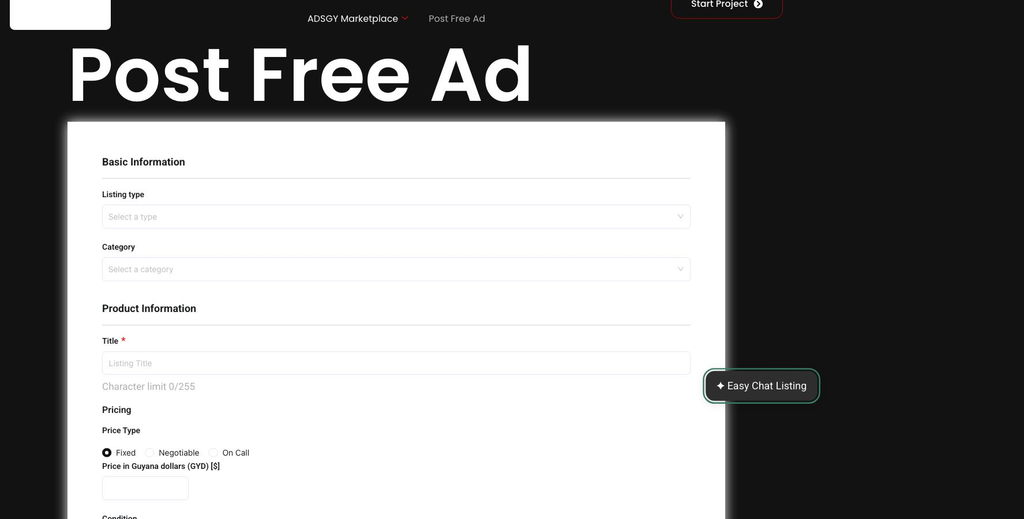
By Sam Barkley, Ads Guyana Ads Guyana (Ads GY) offers two ways to begin preparing an advertisement on its posting page: the ordinary listing form and Easy Chat Listing. The useful choice depends on what you are advertising and how you prefer to provide information. Neither option removes your responsibility to describe the item accurately,
Post a Free Ad in Guyana with Easy Chat Listing
Create a physical-item ad through Ads Guyana’s chat, add photos, review the details and submit a draft for owner review.